RStudio
RStudio is a graphical integrated development environment (IDE) for R. RStudio is the most popular environment for developing both R scripts and packages. RStudio is provided on most Research systems.
There are two methods to launch RStudio on the cluster: command-line and application menu icon.
Launch RStudio by the command-line:
Note that RStudio is a graphical program and in order to run it you must have a local X11 server running or use ThinLinc Remote Desktop environment. See the SSH X11 Forwarding section for more details.
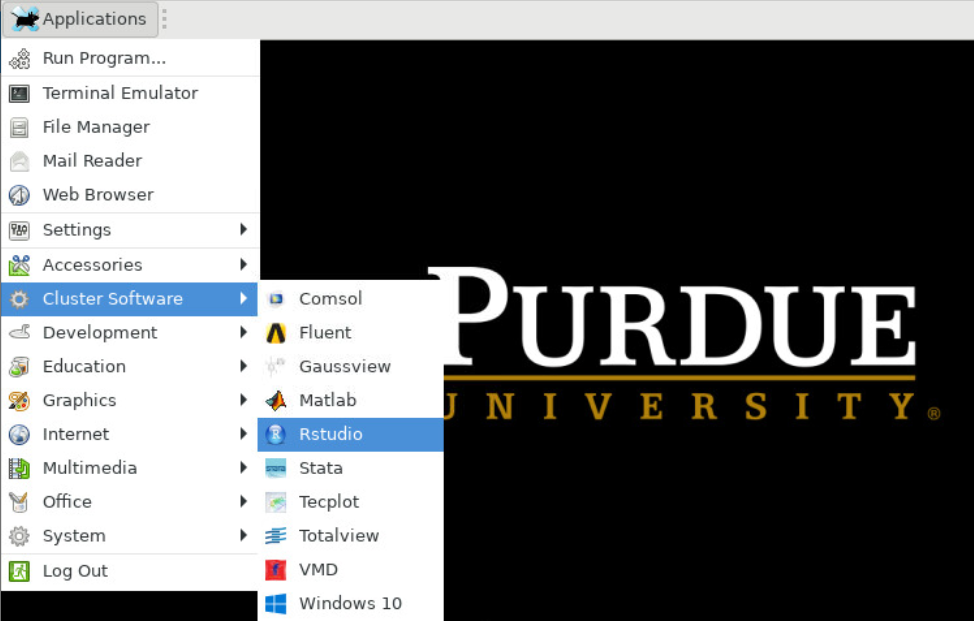
Launch Rstudio by the application menu icon:
- Log into desktop.bell.rcac.purdue.edu with web browser or ThinLinc client
- Click on the
Applicationsdrop down menu on the top left corner - Choose
Cluster Softwareand thenRStudio
R and RStudio are free to download and run on your local machine. For more information about RStudio: