Scheduled Tasks
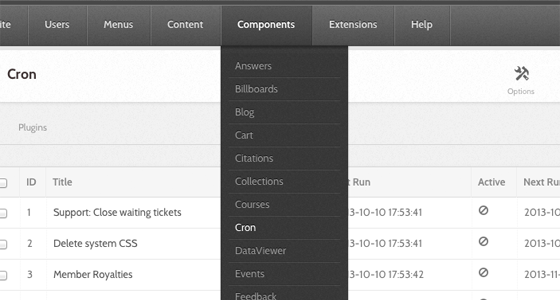
The Cron component manages the hub's scheduled jobs — digest emails, cache cleanup, search indexing, DOI registration, and the rest. Go to Components → Cron.
Nothing here runs until you set it up
This is the section of the book where a feature can be switched on, tested, documented and still do nothing, because the work it depends on happens on a schedule and no schedule exists. Two things have to be true before anything happens at all:
- Something has to tick the hub every minute. That is a Unix cron entry on the server, described under How it works. Without it, no job ever runs, however the administrator interface looks.
- A job has to exist for the thing you want done, and it has to be published. Jobs are rows you create on this screen. Enabling a plugin does not create one.
A new hub has three jobs, and only one of them is published. Everything else in the table below is a feature that will sit there doing nothing until somebody comes to this screen and adds a job for it.
| Waiting for a job | What does not happen without it | Event |
|---|---|---|
| Newsletter mailings | Queued newsletters are never sent | processMailings |
| Search index, on a hub using Solr | New and changed content never reaches the index, so search does not find it | processQueue, runFullIndex |
| Group announcements | Announcements posted in groups are never mailed | sendGroupAnnouncements |
| Group membership dates | Memberships with an end date never expire, and nobody is warned they are about to | expireGroupMemberships, notifyExpiringMemberships |
| Support ticket housekeeping | Pending tickets never close themselves, and no reminders or ticket lists go out | onClosePending, sendTicketsReminder, sendTicketList |
| Activity digests | Members never get their digest email | emailMemberDigest |
| Cache expiry | Expired cache data and old generated CSS are never cleared | trashExpiredData, cleanSystemCss |
| Publication and resource DOIs | Master DOIs are never issued | issueMasterDoi, issueResourceMasterDoi |
Search is the row to read carefully. A stock hub has Engine, on the Search component's Options, set to Basic (default), which queries the database directly and needs no job at all. Only a hub switched to Apache Solr depends on these two events, and on such a hub search quietly stops reflecting reality without them.
None of that is a defect. It is a design decision — the hub does not assume what your site wants on a schedule — but it catches every manager once, because there is nothing on the newsletter screen or the search screen to tell you a job is missing.
Important
If a feature on this hub "does not work" and it involves sending mail, expiring something, or indexing something, check this screen before anything else. Compare each job's Last Run against its recurrence. A job whose last run was three weeks ago on a five-minute schedule means the tick is not arriving at all, and every scheduled feature on the hub is dead, not just the one you noticed.
What ships with a new hub
The install seeds no jobs of its own; three come from migrations that run during installation.
| Job | Event | Recurrence | State as shipped |
|---|---|---|---|
| Group Announcements | sendGroupAnnouncements |
every 5 minutes | Published |
| Process Newsletter Mailings | processMailings |
every 5 minutes | Unpublished |
| Process Newsletter Opens & Click IP Addresses | processIps |
every 5 minutes | Unpublished |
So on a new hub exactly one scheduled job runs. The two newsletter jobs are created for you and left switched off, which is why a manager's first newsletter is composed, sent, and never arrives.
Worked example: the first newsletter goes nowhere
Say the hub has just published its first newsletter issue and no one received it, including you.
- Go to Components → Cron.
- Find Process Newsletter Mailings in the list. Its State is Unpublished, and Last Run is empty.
- Tick it and select Publish. The job is now due — its stored next run is the zero date, which is in the past — so it goes at the next tick.
- Wait five minutes and reload. Last Run should now carry a timestamp. If it does not, the tick is not reaching the hub — go to How it works and check the cron entry on the server.
- Do the same for Process Newsletter Opens & Click IP Addresses if you want open and click tracking. It is not needed to send mail.
Publishing a job is safe and reversible: unpublish it again and it stops. The button to be careful with on this screen is Run, which runs the selected jobs immediately — on a mailing job that means the queue goes out now, to real addresses, whatever you were expecting.
Note
A job is not the same as a plugin. The plugin supplies the event;
the job says when to fire it. Both have to be in place. Most cron plugins
ship enabled, but Cron - Forum ships disabled, so emailGroupForumDigest
is not on the Event menu until you enable it at Extensions → Plugin
Manager.
How it works
Unix cron does not run each hub job. It ticks the CMS, once a minute, and the CMS runs whichever jobs are due. Everything about a job — what it does, how often, and whether it runs at all — is configured in the administrator interface.
There are two ways to deliver the tick.
Over HTTP. A request to index.php?option=com_cron&task=tick&no_html=1
runs the pending jobs. The request must come from an allowed address: the
caller either has core.manage on com_cron, or its IP is in the
component's whitelist option (default 127.0.0.1), or it resolves to the
server's own hostname or to localhost. Anything else gets a 404.
From the command line. muse cron:jobs tick makes that HTTP request for
you, taking the URL from the CMS live_site setting and holding a lock so
ticks cannot pile up:
The cron:jobs command has four other tasks:
| Task | What it does |
|---|---|
run |
Run pending jobs in this process. --job=5 runs only that job |
list |
List jobs that are due. -a lists every published job |
deactivate |
Mark a job inactive |
unpublish |
Unpublish a job |
cron:jobs is a component command, so it does not appear in muse help or in
the generated muse reference, which covers
only the commands under core/libraries/Hubzero/Console/Command/. Run
muse cron:jobs help for its own documentation.
Jobs claim themselves before running, so a manual run from the administrator interface and a scheduled tick cannot execute the same job at once, and a job whose process died is reclaimed.
The job list
The columns are ID, Title, State, Starts, Ends, Active, Last Run and Next Run. The recurrence is not among them; to see how often a job runs, open it. The toolbar carries Run (run the selected jobs now), Publish, Unpublish, Deactivate, New, Delete, and Options.
Last Run and Next Run are the two that tell you whether the hub is healthy. Read them together: a Next Run in the past on a published job means the tick has stopped.
Warning
Delete here removes the job row for good. It asks for confirmation and then destroys the record; it is not the reversible trash you get on the Article Manager — see States, deleting and check-out. If you only want a job to stop, use Unpublish, which keeps the row and its history.
Options holds one setting, the IP whitelist, which defaults to
127.0.0.1 — see the
generated parameter list.
Leave it at the default unless the tick comes from another machine. Widening
it lets anything at that address run every due job on the hub without logging
in.
Creating and editing a job
A job has four fieldsets: Details, the event's own Parameters, Recurrence, and Publishing, plus an Execution option.
Details
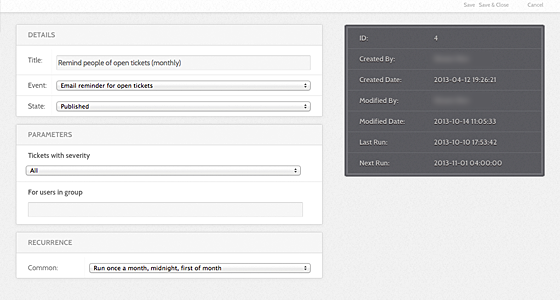
- Title (required) What the job is called in the list.
- Event (required) The plugin event this job triggers, chosen from a drop-down grouped by plugin. This is the job — everything else is scheduling. The event cannot be changed to something no installed cron plugin offers.
The events on offer come from the enabled plugins in core/plugins/cron/:
| Plugin | Events |
|---|---|
activity |
emailMemberDigest |
cache |
cleanSystemCss, trashExpiredData |
courses |
syncPassportBadgeStatus, emailInstructorDigest |
forum |
emailGroupForumDigest |
groups |
cleanGroupFolders, sendGroupAnnouncements, expireGroupMemberships, notifyExpiringMemberships |
members |
onPointRoyalties |
newsletter |
processMailings, processIps |
projects |
computeStats, googleSync, gitGc |
publications |
sendAuthorStats, rollUserStats, runMkAip, issueMasterDoi, updateFtpLinks, buildPublicationBundles |
resources |
issueResourceMasterDoi, auditResourceData, emailMemberResources, updateResourceRanking |
search |
processQueue, runFullIndex |
storefront |
emailPublishDownNotifications |
support |
onClosePending, sendTicketsReminder, sendTicketList, cleanTempUploads |
users |
cleanAuthTempAccounts |
The cron events reference lists each event with its listeners.
Parameters
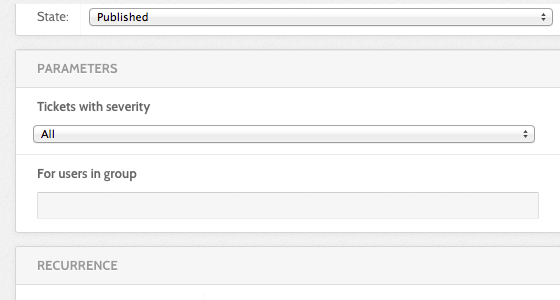
Every event brings its own parameters, and the form swaps them in when you pick the event. An event with none shows "No parameters found".
Recurrence
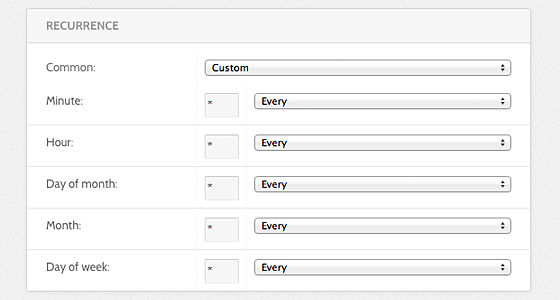
Frequency offers the common schedules:
| Option | Cron expression |
|---|---|
| Run once a year, midnight, Jan. 1st | 0 0 1 1 * |
| Run once a month, midnight, first of month | 0 0 1 * * |
| Run once a week, midnight on Sunday | 0 0 * * 0 |
| Run once a day, midnight | 0 0 * * * |
| Run once an hour, beginning of hour | 0 * * * * |
| [ Custom ] | Set the five fields below by hand |
Choosing [ Custom ] opens Minute, Hour, Day of month,
Month, and Day of week. Each has a drop-down of common values —
Every, Every 5, Every 10, weekday and month names — and a text box for
anything else.
Publishing
- State — Published, Unpublished, or Trashed. Only published jobs run.
- Start running / Stop running — an optional window. A job outside its window is skipped even while published.
The list also shows an Active flag. That is not a setting: it means the job is running right now, or was claimed by a process that has not released it. Deactivate clears a stuck claim.
Execution
-
Run in a detached process — run the job in its own background process instead of inside the web tick, so a long batch job does not tie up a web worker. A detached job runs without a web request, so it cannot build correct absolute URLs unless
live_siteis set. The form warns when it is empty. Never enable it for a job that emails links.Caution
Detached execution is marked a prototype in the code. Use it for archival and bundle-building jobs, not for anything that sends mail.
Rewritten and checked against 2.4-main @ 35f103b1b3 on 2026-09-10.