Run nf-core Pipelines in Open OnDemand
This tutorial walks you through one complete nf-core run on Gautschi without writing a job script. You open a web form, point it at a samplesheet, submit, and then open the MultiQC report in your browser. The worked example is nf-core/rnaseq 3.26.0 on the pipeline's small test dataset, so the run finishes quickly. It accompanies Genomics Exchange Fall 2026, Session 6.
Open OnDemand (OOD) is a web portal to the cluster. From a browser you can browse and edit files, open a terminal, check your jobs, and launch applications through forms instead of commands. Behind every form, OOD writes and submits an ordinary Slurm job on your behalf.
nf-core is a community collection of peer-reviewed Nextflow pipelines for common genomics assays, such as RNA-seq, variant calling, and metagenomics. Each pipeline ships a parameter schema that describes every option it accepts. On Gautschi, each pipeline app turns that schema into a web form and runs the pipeline with the purdue_gautschi institutional profile from nf-core/configs.
-
Prerequisites
- An active Gautschi account and a Slurm account (
<account-name>). Runsliston Gautschi to list yours. - A web browser. You paste one staging command in step 4; no other command-line work is needed.
- Helpful: what a Nextflow pipeline, profile, and samplesheet are (Nextflow and nf-core).
- An active Gautschi account and a Slurm account (
-
Objectives
- Open the nf-core Pipelines app and choose a pipeline by assay.
- Complete and submit the rnaseq 3.26.0 form with every required field set.
- Monitor the launcher job, its Slurm child jobs, and the Nextflow log.
- Open the MultiQC and execution reports, and find the files that record the run.
- Resume or re-run a run, and run the same analysis from the command line.
When to use the OOD app and when to use the command line
| Use the OOD app when | Use the command line when |
|---|---|
| You are new to the cluster or to Nextflow. | You run the same pipeline on many batches and want to script it. |
| You want every option listed, with help text, in one place. | You need a pipeline or version that has no app yet. |
| You want to see job status and outputs in the browser. | You need nested configs, custom modules, or nextflow options the form does not expose. |
| You are re-running a past analysis from its parameters file. | You are developing or modifying a pipeline. |
Both routes run the same pipeline code, profile, and container images, so results are equivalent. Step 9 shows the command-line version of this run.
1. Log in to the Gautschi gateway
Open the Gautschi gateway in your browser and sign in with your Purdue Career Account and BoilerKey (Duo):
You land on the OOD dashboard. The menu bar at the top has Files, Jobs, Clusters, and Interactive Apps. You use all four in this tutorial.
For more about the gateway, see the Gautschi Gateway guide.
2. Open the nf-core Pipelines app
Select Interactive Apps, then nf-core Pipelines. This one app is the entry point for every nf-core pipeline on Gautschi. The individual pipeline apps do not appear in the menu; you reach them from its cards.
The first time only, OOD shows a page that says "App has not been initialized or does not exist" with an Initialize App button. This is expected. Click Initialize App. OOD applies a configuration change and restarts your personal web server, which takes a few seconds, and then the landing page loads. You will not see this page again.
What the one-time restart interrupts
The restart does not affect running Slurm jobs, including pipeline runs you launched earlier, or any files. It does close open browser terminal (Shell Access) sessions and discard unsaved edits in the OOD file editor. Save your work and reopen the terminal afterwards.
3. Choose a pipeline by assay
The landing page lists all 15 nf-core pipelines installed on Gautschi as cards, grouped by assay: RNA & expression, Single-cell, Variant calling, Epigenomics, Microbiome & pathogens, Long-read, Data retrieval & QC, and Genome assembly. Each card shows the pipeline name and the exact version that the app runs.
Type in the Filter pipelines... box to narrow the list. For this tutorial, type rnaseq. Two cards remain, nf-core/rnaseq and nf-core/scrnaseq. Select Launch on the nf-core/rnaseq 3.26.0 card in the RNA & expression group.
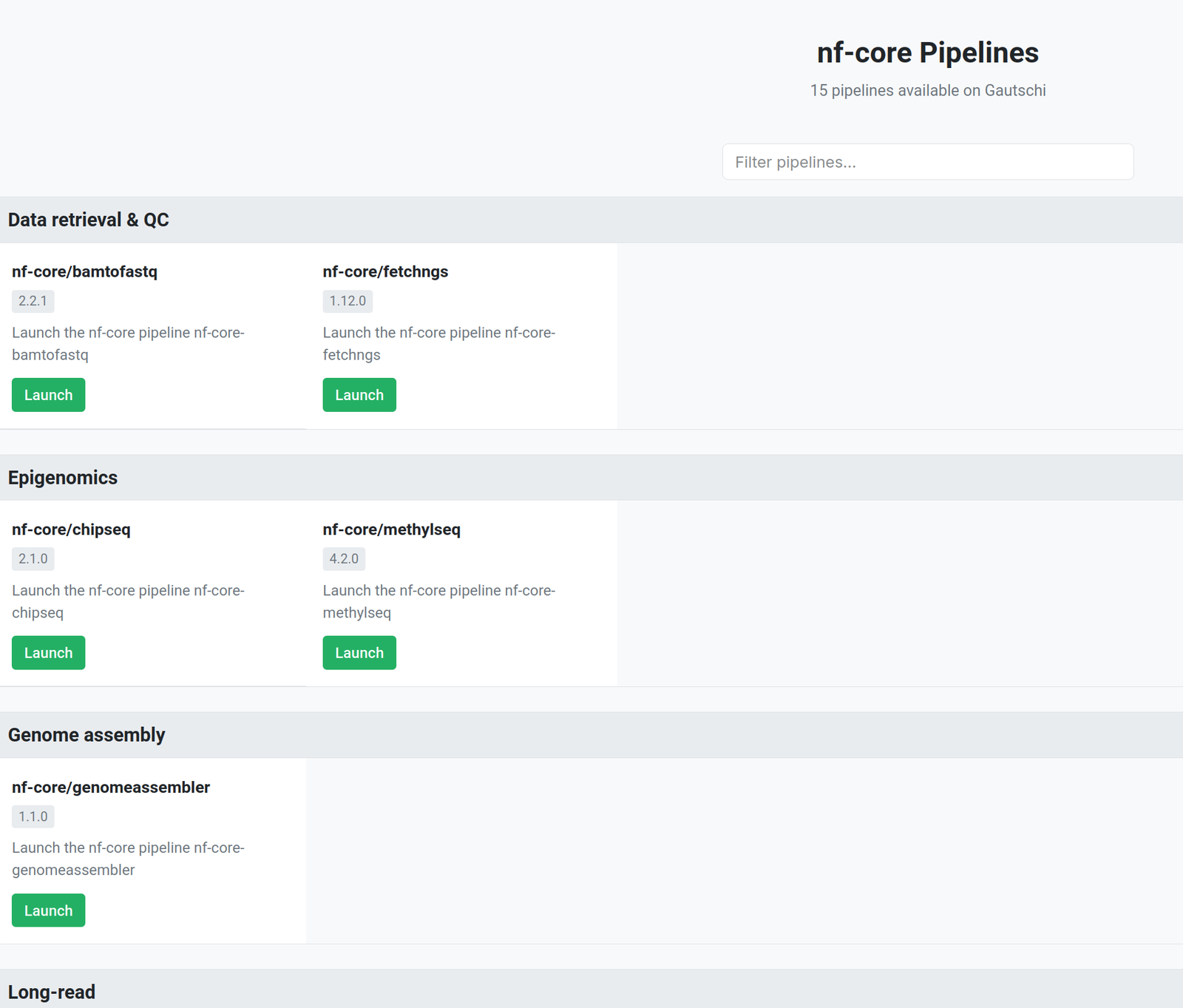
The full list with one-line use cases:
| Assay group | Pipeline | Version | Use it to |
|---|---|---|---|
| RNA & expression | rnaseq | 3.26.0 | Align, quantify, and QC bulk RNA-seq reads against a reference. |
| RNA & expression | differentialabundance | 1.5.0 | Test count matrices for differential expression or abundance. |
| RNA & expression | denovotranscript | 1.1.0 | Assemble a transcriptome without a reference genome. |
| Single-cell | scrnaseq | 4.1.0 | Produce count matrices from droplet-based single-cell RNA-seq. |
| Variant calling | sarek | 3.8.1 | Call germline or somatic variants from whole-genome or exome reads. |
| Epigenomics | chipseq | 2.1.0 | Call and QC peaks from ChIP-seq. |
| Epigenomics | methylseq | 4.2.0 | Align bisulfite or enzymatic methylation reads and call methylation. |
| Microbiome & pathogens | ampliseq | 2.17.0 | Profile amplicon (16S, ITS, 18S) communities. |
| Microbiome & pathogens | mag | 5.4.2 | Assemble and bin metagenome-assembled genomes. |
| Microbiome & pathogens | taxprofiler | 2.0.0 | Classify shotgun metagenome reads taxonomically with several profilers. |
| Microbiome & pathogens | pathogensurveillance | 1.1.0 | Identify and type bacterial or eukaryotic pathogen isolates. |
| Long-read | nanoseq | 3.1.0 | QC, align, and quantify Oxford Nanopore reads. |
| Data retrieval & QC | fetchngs | 1.12.0 | Download FASTQ files and metadata from SRA, ENA, DDBJ, or GEO. |
| Data retrieval & QC | bamtofastq | 2.2.1 | Convert BAM or CRAM files back to FASTQ. |
| Genome assembly | genomeassembler | 1.1.0 | Assemble and evaluate genomes from long reads. |
4. Stage the inputs and samplesheet
nf-core pipelines read a samplesheet: a CSV file with one row per sequencing run that lists the sample name, the FASTQ path or paths, and the library strandedness. Use absolute paths in the samplesheet.
Where your data should live
| Storage | Use it for | Keep in mind |
|---|---|---|
Depot (/depot/<lab>/) |
Raw data, references, and final results you must keep. | Backed up and shared with your lab. Not the fastest for heavy pipeline I/O. |
Scratch ($RCAC_SCRATCH) |
The run itself: inputs being processed, the Nextflow work directory, and outputs being reviewed. | Fast and large, but not backed up, and old files are purged. Copy final results to Depot. |
Home ($HOME) |
Small configuration files only. | Small quota. Never run pipelines here. |
For this tutorial, everything lives in one project folder in scratch: $RCAC_SCRATCH/ge06-rnaseq/.
Open a terminal from Clusters, then Gautschi Shell Access, and run the staging script. It copies the rnaseq test data from a shared location into your scratch and writes the samplesheet for you.
What the staging script does (click to expand)
After it finishes, your project folder looks like this:
Two rows with the same sample name
WT_REP1 and RAP1_UNINDUCED_REP2 each appear twice. That is intentional: each is one sample sequenced in two runs. nf-core/rnaseq merges rows that share a sample name before quantification. Use the same pattern for your own resequenced libraries.
5. Fill in the rnaseq form
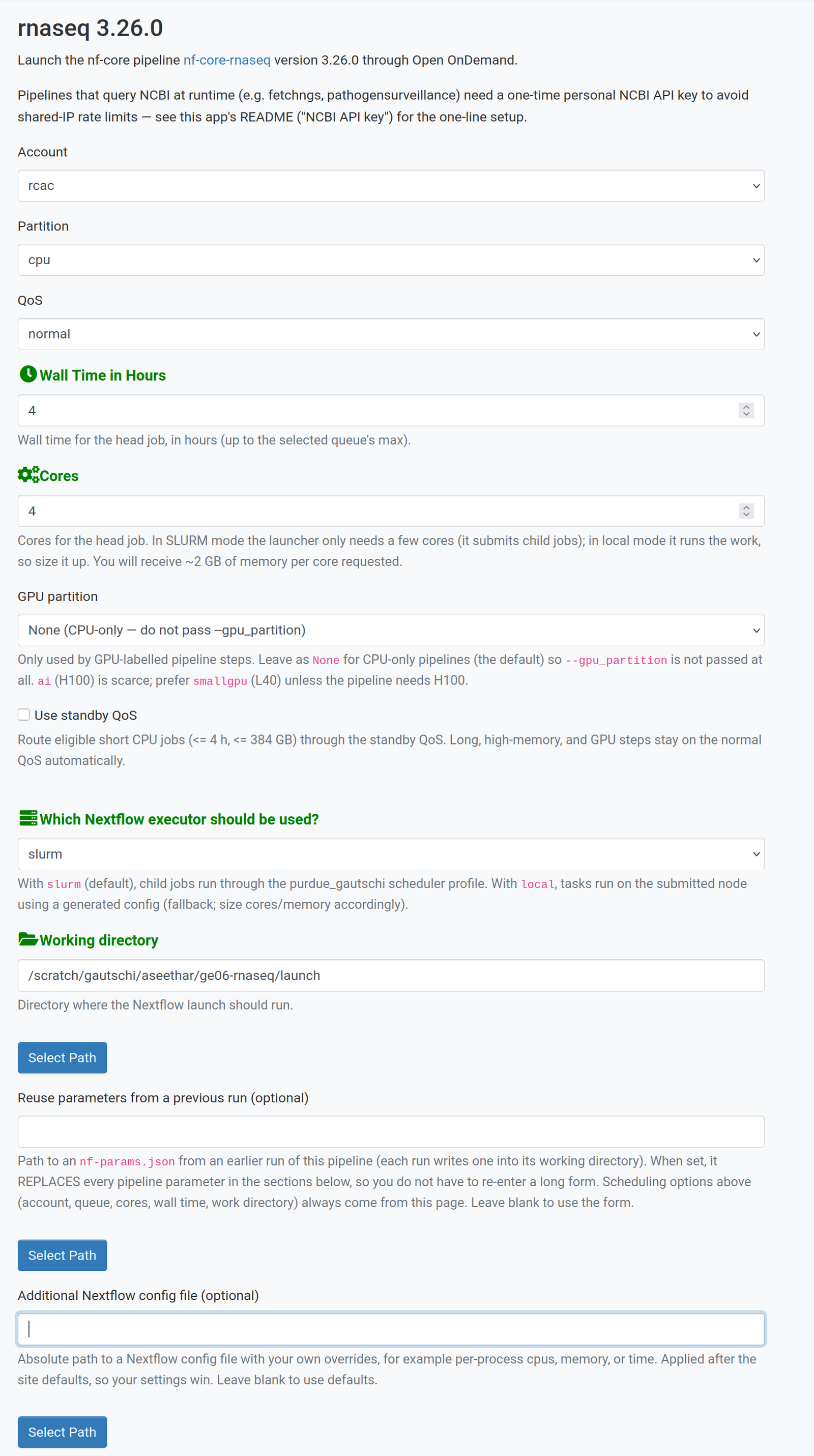
The form has two parts. The top part controls how the job runs on Gautschi (account, time, cores). The sections below it are the pipeline's own parameters, one field per option in the nf-core schema, using the schema's option names as labels. The pipeline sections all start collapsed, with their checkboxes unticked. In form order they are Input/output options, Reference genome options, Read trimming options, Read filtering options, UMI options, Alignment options, Optional outputs, Quality Control, and Process skipping options. This run opens only the first two. Tick a section's checkbox to open it; a section you filled in before reopens with your earlier values. Hover over or read the help text under any field for its meaning.
Scheduling options
| Field | Value for this run | What it controls |
|---|---|---|
| Account | <account-name> |
The Slurm account charged for the launcher job and every child job. |
| Partition | cpu |
Where the launcher job runs. Child jobs are routed by the profile. |
| QoS | normal (the default) | Quality of service for the launcher job. |
| Wall Time in Hours | 4 |
Time limit for the launcher job, which must outlive the whole pipeline. |
| Cores | 4 |
Cores for the launcher job. You receive about 2 GB of memory per core. In slurm mode the launcher only submits jobs, so a few cores are enough. |
| GPU partition | None (CPU-only) | Only for pipelines with GPU steps. rnaseq needs none. |
| Use standby QoS | leave unticked (the default) | Ticking it sends short child jobs (up to 4 hours and 384 GB) through the standby QoS, which uses idle capacity and may start sooner or later depending on cluster load. |
| Which Nextflow executor should be used? | slurm |
slurm submits each pipeline step as its own Slurm job. local runs everything inside the launcher job. |
| Working directory | $RCAC_SCRATCH/ge06-rnaseq/launch (use Select Path) |
Where Nextflow starts and writes nf-params.json and .nextflow.log. |
| Reuse parameters from a previous run (optional) | leave blank | See step 8. |
| Additional Nextflow config file (optional) | leave blank | Your own Nextflow overrides, applied last. |
The Account and Partition lists show only what your own account can use, so your choices may differ from a labmate's. Run slist to see your accounts.
Input/output options (tick the section to open it)
| Field | Value |
|---|---|
input |
$RCAC_SCRATCH/ge06-rnaseq/samplesheet.csv |
outdir |
$RCAC_SCRATCH/ge06-rnaseq/results |
multiqc_title |
GE06 rnaseq test |
Reference genome options (tick the section to open it)
| Field | Value |
|---|---|
fasta |
$RCAC_SCRATCH/ge06-rnaseq/data/reference/genome.fasta |
gtf |
$RCAC_SCRATCH/ge06-rnaseq/data/reference/genes.gtf.gz |
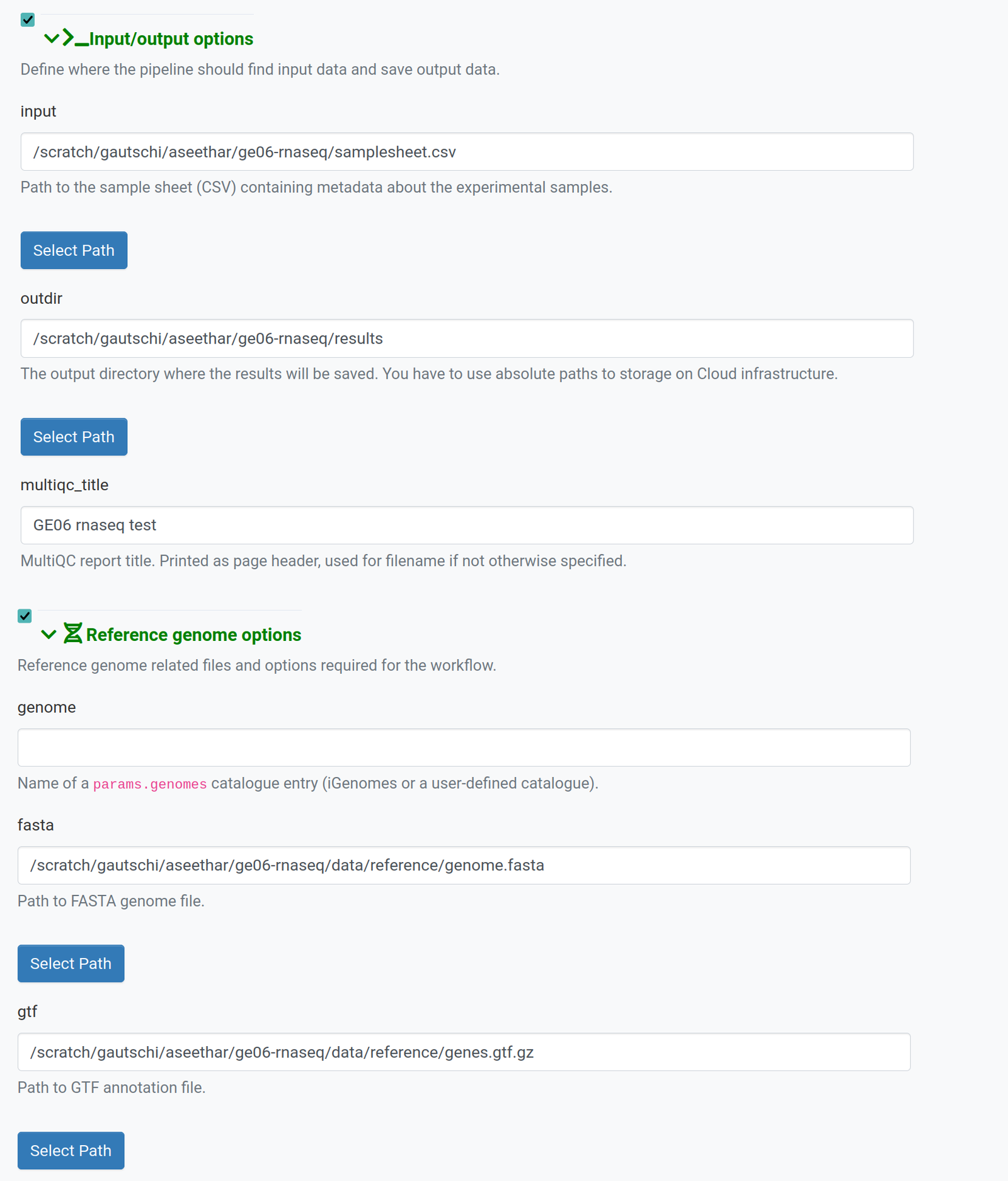
Leave every other section at its defaults. Leave Resume previous run, at the bottom of the form above Launch, unticked for a first run.
Use absolute paths without shell variables
The Working directory, input, outdir, fasta, and gtf fields each have a Select Path button under the field. Prefer Select Path over typing: a path that is off by one character, such as a missing .gz suffix, fails the run within a minute. Select Path fills in full paths such as /scratch/gautschi/<username>/ge06-rnaseq/samplesheet.csv. If you type a path, type it in full. The form does not expand $RCAC_SCRATCH or ~; they are written that way above only so the table fits your username.
How these values differ from the pipeline's test profile
This run keeps only the parameters a real user fills in: input, outdir, multiqc_title, fasta, and gtf. Compared with the nf-core/rnaseq 3.26.0 test profile, it omits gff, transcript_fasta, additional_fasta, hisat2_index, salmon_index, bbsplit_fasta_list (so skip_bbsplit stays at its default of true), kraken_db, pseudo_aligner, and umitools_bc_pattern, plus the test profile's extra process settings. The pipeline builds the indices it needs, such as the STAR index, from fasta and gtf during the run, so you need no pre-built index.
6. Launch and monitor the run
Select Launch at the bottom of the form. OOD redirects you to My Interactive Sessions, where a card for this run appears. The card starts as Queued and turns Running when the launcher job starts. The card is titled rnaseq 3.26.0 (
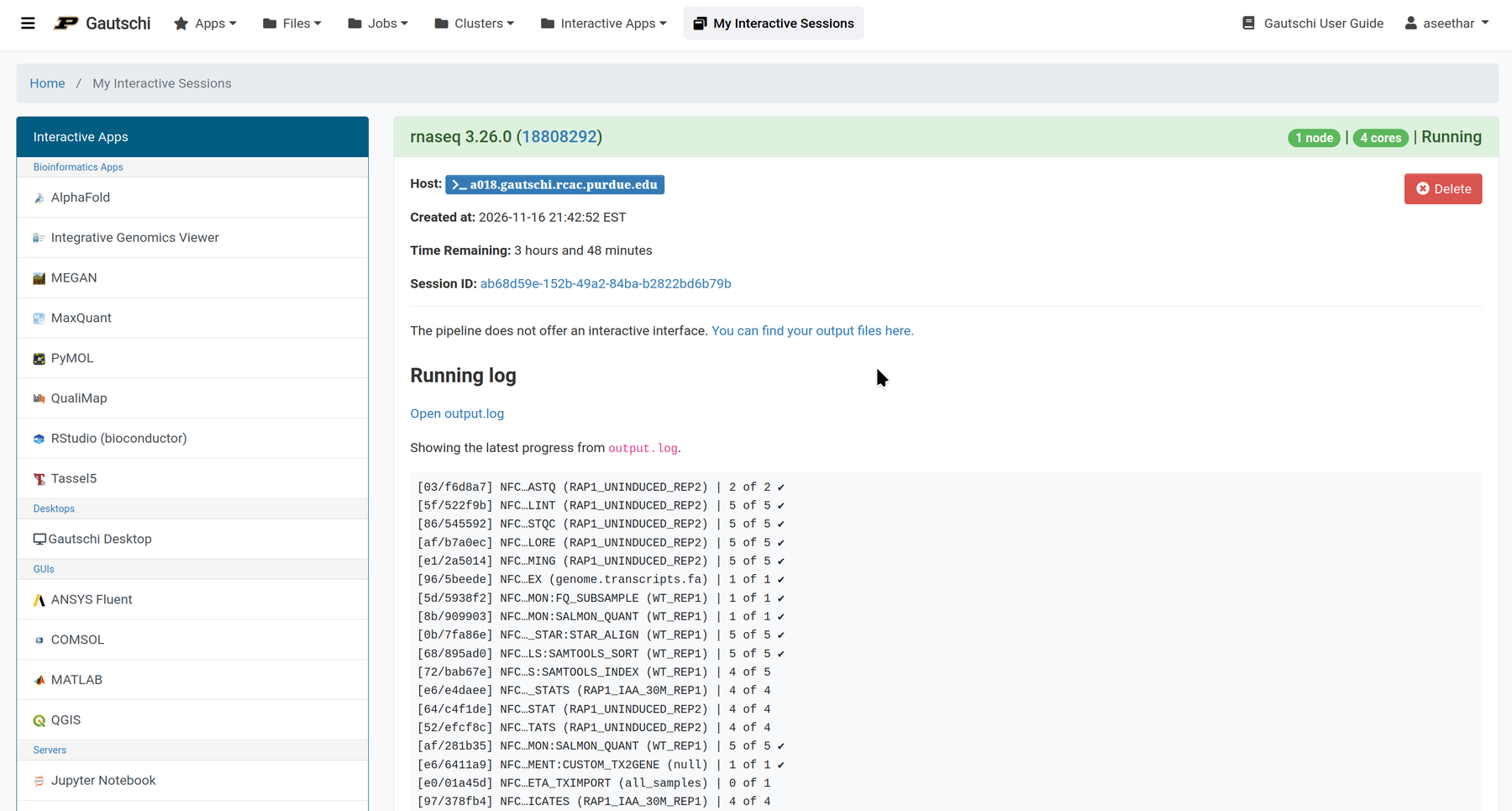
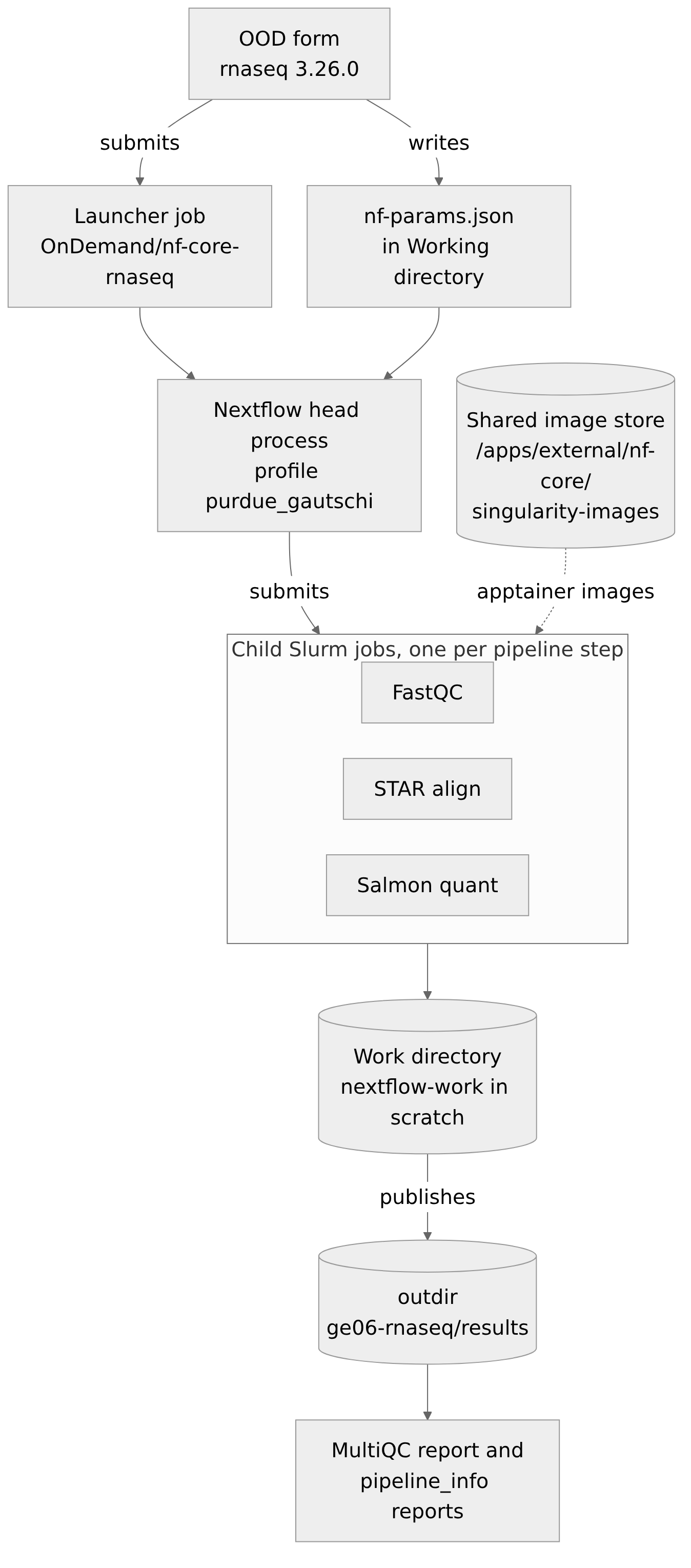
What happens after Launch:
- OOD writes your form values to
nf-params.jsonand submits one launcher job (Slurm job nameOnDemand/nf-core-rnaseq) with your account, partition, cores, and wall time. - Inside the launcher job, Nextflow starts with the
purdue_gautschiprofile. This is the Nextflow head process. It reads the samplesheet and plans the work. - For each pipeline step, the head process submits a child Slurm job to the
cpupartition (orhighmemfor tasks that need more than 384 GB), charged to the same account. - Each child job runs its tool inside an apptainer container taken from the shared image store,
/apps/external/nf-core/singularity-images. You do not download any images. - Intermediate files go to the Nextflow work directory,
$RCAC_SCRATCH/nextflow-work. Finished outputs are published to youroutdir.
The app writes these into your working directory (launch/): nf-params.json, .nextflow.log, .nextflow/, gautschi-runtime.config, and gautschi-shared-images.config. nf-params.json records every field on the form, including the ones left at their defaults.
Three places to watch
| Where | How to open it | What it tells you |
|---|---|---|
| Session card | Interactive Apps, then My Interactive Sessions | Whether the launcher job is queued, running, or completed, and the latest progress lines of output.log in its Running log section. |
| Slurm queue | Jobs, then Active Jobs, or squeue -u $USER in the shell |
The launcher job plus a changing set of child jobs, named after pipeline steps. |
| Logs | Open output.log in the card's Running log section. (The Session ID link opens the session folder.) .nextflow.log is in your working directory. |
output.log shows Nextflow's progress table. .nextflow.log has full detail for debugging. |
The launcher must outlive the pipeline
If the launcher job hits its wall time, Nextflow stops and submits no more steps. Set Wall Time in Hours to the time you expect the whole pipeline to take, plus a margin. Child jobs request their own time.
The test run takes about 15 to 20 minutes from Launch to completion when the cluster is quiet, and longer when queues are busy. A real dataset takes hours.
7. Open the results
When the card shows Completed, open Files, then Home Directory, and use Go To... to enter your project folder in scratch. Open results/.
Open these four files, in this order. In the file browser, select an HTML file's name, then View, to open it in a new browser tab.
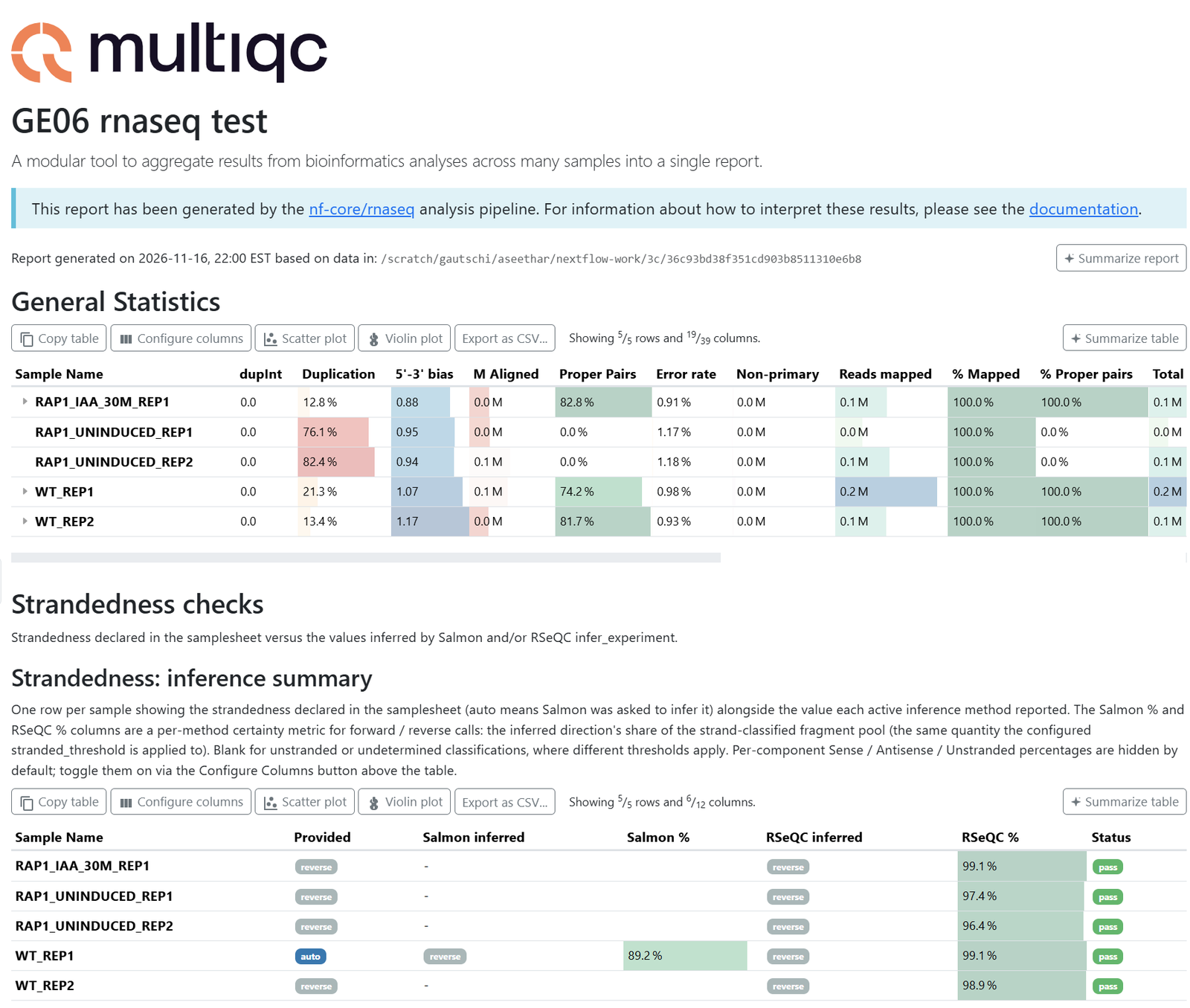
multiqc/star_salmon/multiqc_report.html: one page of quality metrics for every sample (read quality, alignment rate, strandedness, duplication). Start every review here. Because you setmultiqc_title, the title appears as the report heading.pipeline_info/execution_report_<timestamp>.html: CPU, memory, and time used by every step. Use it to size your next run.pipeline_info/params_<timestamp>.jsonandnf_core_rnaseq_software_mqc_versions.yml: every parameter and every tool version used.star_salmon/salmon.merged.gene_counts.tsv: the gene count matrix for differential expression with nf-core/differentialabundance or DESeq2.
Scratch is purged
Scratch is not backed up, and old files are removed automatically. Copy results/ and launch/nf-params.json to Depot as soon as you have reviewed them. Do not delete $RCAC_SCRATCH/nextflow-work itself: every nf-core run you launch from the app shares it. To clear one run's intermediate files, run nextflow clean -f from that run's working directory (after module --force purge and module load nextflow/25.10.04).
8. Resume or re-run
Open the rnaseq app again from the landing page. Two fields help you go further: Resume previous run, a checkbox at the bottom of the form above Launch, and Reuse parameters from a previous run (optional), below Working directory.
| Field | Use it when | What happens |
|---|---|---|
| Resume previous run | A run failed or was stopped, and you fixed the cause. | Nextflow reuses every completed step from the work directory and runs only what is left. |
| Reuse parameters from a previous run (optional) | You want to repeat an earlier run exactly, or share it with a labmate. | Select that run's nf-params.json. It replaces every pipeline parameter on the form. Scheduling options (account, partition, cores, wall time, working directory) still come from the form. |
Resume needs the same working directory
Nextflow keeps its record of completed steps in the working directory you launched from (.nextflow/ inside launch/). Keep Working directory the same as the failed run, or resume starts over.
Every launch, including a resume, adds a new timestamped set of files to results/pipeline_info/, and the latest set is the complete record.
The form reopens with the values you submitted last time, so check every field and change what differs before you launch again.
9. Run the same pipeline from the command line
The app runs an ordinary nextflow run command. In output.log, the command appears near the top on one line, with the word Executing: repeated before each part of it. Cleaned up, the command the app ran for this tutorial is:
The two -c files are written into the working directory by the app.
Here is the same analysis from the command line. It reads the samplesheet and reference files that stage_ge06.sh wrote in step 4.
Save this script as $RCAC_SCRATCH/ge06-rnaseq/ge06_rnaseq.sbatch:
Replace both <account-name> placeholders with your account, then submit:
Notes on the script:
-r 3.26.0pins the same pipeline version the app runs. If you leave it out, Nextflow runs the latest release.- The three exports keep image downloads out of your home directory and read the pre-loaded images from the shared store,
/apps/external/nf-core/singularity-images. - Outputs go to
results-cli/and the work directory islaunch-cli/work, separate from the app run. - It does not set
--mem. On Gautschi, memory follows the number of cores you request. - It starts with
module --force purge, which is required. A plainmodule purgeleaves the stickyxaltmodule loaded, which breaks containers.
To repeat an app run exactly, pass its launch/nf-params.json with -params-file instead of the individual options.
10. Reproducibility, limits, and getting help
What is recorded for every run
| Record | Where it is |
|---|---|
| Pipeline and version | Fixed per app (rnaseq 3.26.0), and in the pipeline path on the Executing: line near the top of output.log |
| Every parameter | launch/nf-params.json (what you submitted) and results/pipeline_info/params_<timestamp>.json (what the pipeline resolved) |
| Profile | purdue_gautschi from nf-core/configs, named after -profile on the Executing: line |
| Software and containers | results/pipeline_info/nf_core_rnaseq_software_mqc_versions.yml, and images in /apps/external/nf-core/singularity-images |
| Resources used | results/pipeline_info/execution_report_<timestamp>.html and execution_trace_<timestamp>.txt |
Keep nf-params.json with your results. Together with the app version, it is a complete, shareable description of the run: a labmate can select it in Reuse parameters from a previous run and repeat your analysis. See Reproducible Genomics on RCAC for the wider checklist.
Known limits
- The nf-core apps are available on Gautschi only. Support for Anvil is planned after its Open OnDemand upgrade. Older nf-core apps on other RCAC clusters were removed because they were out of date.
- Each app runs one pipeline version. To run a different version, use the command line.
- Pipelines that query NCBI while running (fetchngs and pathogensurveillance) need a personal NCBI API key, set up once in
~/.config/nfcore-ood/secrets.env. Never type a key into the form. - Container images for each app's pipeline version are pre-loaded. If a step reports a missing image, email rcac-help@purdue.edu with the
output.log. - The
localexecutor runs every step inside the launcher job. Use it only for very small runs.
Request a pipeline or get help
Email rcac-help@purdue.edu with "nf-core" in the subject. To request a new pipeline or version, include the pipeline name, the version, and a sentence on your use case. For a failed run, include the session's output.log and the path to your working directory.
11. Conclusion
You ran nf-core/rnaseq 3.26.0 on Gautschi entirely from a browser: you opened the nf-core Pipelines app, picked a pipeline by assay, staged inputs in scratch, filled in the form, watched the launcher and child jobs, and opened the MultiQC and execution reports. You also saw that the form writes an ordinary parameters file and runs an ordinary nextflow run command, so every run can be repeated from the app or from the command line.
Next, try the same steps with your own samplesheet, and copy each run's results/ and nf-params.json to Depot. To go a step further and turn your own scripts into a Nextflow workflow, join Session 5: Script to pipeline on Nov 24, 2026.
Troubleshooting
| Symptom | Likely cause | Fix |
|---|---|---|
| "App has not been initialized or does not exist" | First time opening the nf-core Pipelines app. | Click Initialize App. This is expected (step 2). |
| Browser terminal closed by itself | The one-time Initialize App restart. | Reopen Gautschi Shell Access. Running jobs are unaffected. |
| Card stays Queued for a long time | The partition is busy. | Wait, or check squeue -u $USER for the reason. Smaller cores and wall time on the launcher start sooner. |
| Card goes Completed within a minute or two | The launcher stopped early, most often because a typed path does not exist, for example a missing .gz suffix. |
Read the last lines of output.log on the session card, correct the path with Select Path, and launch again. |
ERROR: purdue_gautschi profile requires --cluster_account |
No account was selected. | Choose your account in the form. Run slist to list accounts. |
| Samplesheet validation error naming a row or column | Wrong header, a relative path, or a missing file. | Check the header is sample,fastq_1,fastq_2,strandedness, use absolute paths in the samplesheet, and confirm every file exists. |
Run stopped partway with a time-limit message in output.log |
The launcher job reached its wall time. | Increase Wall Time in Hours, tick Resume previous run, keep the same working directory, and launch again. |
| One step fails once with a scheduler or node error, and the same step worked for other samples | A transient Slurm or node problem. | Tick Resume previous run, keep the same Working directory, and launch again. Completed steps are reused. |
| One step fails with an out-of-memory or time-limit error | That task needs more resources than the pipeline default. | Add an Additional Nextflow config file that raises memory or time for that process, then resume. |
Disk quota exceeded in a log |
Something is writing to $HOME. |
Set Working directory and outdir in scratch, then resume. |
| Results folder is missing files you saw yesterday | Scratch purge, or a different outdir. |
Check outdir in launch/nf-params.json. Copy results to Depot after every run. |
For more Nextflow troubleshooting, see Nextflow on Gautschi.
FAQs [click to expand]
1. Do I need to know Nextflow to use these apps?
No. The form replaces the command line. Knowing what a samplesheet and a profile are helps you read errors, and Nextflow and nf-core covers both.
2. Why did OOD ask me to Initialize App?
The nf-core Pipelines landing page needs a one-time change to your personal web server. OOD asks once, restarts that server in a few seconds, and never asks again. Running jobs and files are unaffected; open browser terminals close.
3. Why are there two jobs, or many jobs, in my queue?
The app submits one launcher job that runs Nextflow. Nextflow then submits a separate Slurm job for each pipeline step. This is normal and lets steps run in parallel.
4. How much memory does the launcher job get?
About 2 GB per core. The default of 4 cores is enough in slurm mode, because the launcher only coordinates. Pipeline steps request their own memory.
5. Can I close my browser after launching?
Yes. The run is a Slurm job and keeps going. Reopen My Interactive Sessions later to see its status.
6. Where are the container images, and do I need to pull them?
No pulling is needed. The app uses apptainer images from a shared store, /apps/external/nf-core/singularity-images, prepared for each installed pipeline version.
7. Can I run the pipeline on data in Depot?
You can read inputs from Depot, but put outdir and the working directory in scratch, which is faster and larger. Copy final results back to Depot.
8. How do I run a version of rnaseq that has no app?
Use the step 9 script and change -r 3.26.0 to the version you need. See also Nextflow on Gautschi. Container images for that version may not all be in the shared store, so the first run downloads any missing ones into your scratch.
9. Can I share a run with a labmate?
Yes. Give them your launch/nf-params.json. They select it in Reuse parameters from a previous run, choose their own account, and launch. They need read access to your inputs.
10. What does Use standby QoS do?
It is unticked by default, and this tutorial leaves it unticked. Ticking it sends short child jobs (up to 4 hours and 384 GB) through the standby QoS, which uses idle capacity. Depending on cluster load, those jobs may start sooner or later than on the normal QoS. Longer, high-memory, and GPU steps stay on the normal QoS automatically.
11. My run failed. Do I start over?
No. Fix the cause, tick Resume previous run, keep the same Working directory, and launch again. Completed steps are reused.