Jobs
There are four apps under the Jobs apps: Active Jobs and Job Composer. These are detailed below.
Active Jobs
This shows you active SLURM jobs currently on the cluster. The default view will show you your current jobs, similar to squeue --me. Using the button labeled "Your Jobs" in the upper right allows you to select different filters by queue (account). All accounts output by slist will appear for you here. Using the arrow on the left hand side will expand the full job details.

The table of active jobs shows useful information such as queue, status, cluster, and ID. It can be sorted by clicking the headers of each column or searched with the "Filter" box above it.
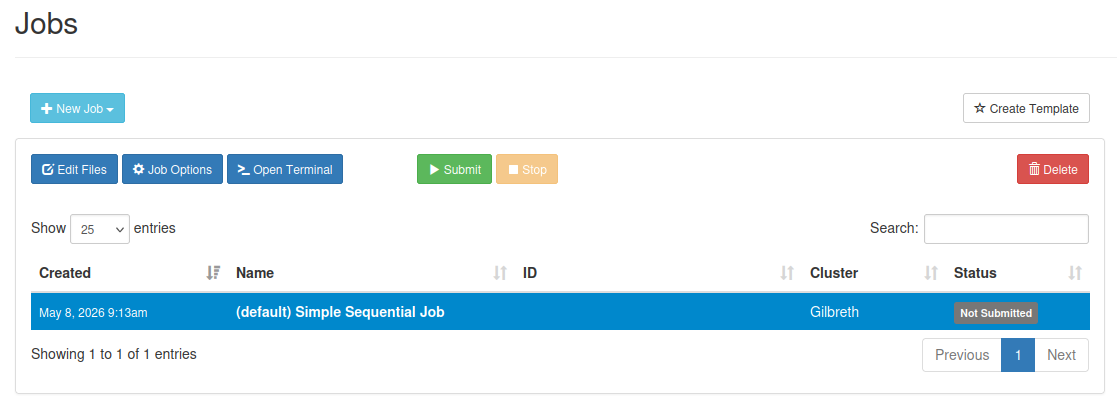
Job Composer
The Job Composer app allows you to create and submit jobs to the cluster. You can select from pre-defined templates (most of these are taken from the User Guide examples) or you can create your own templates for frequently used workflows.
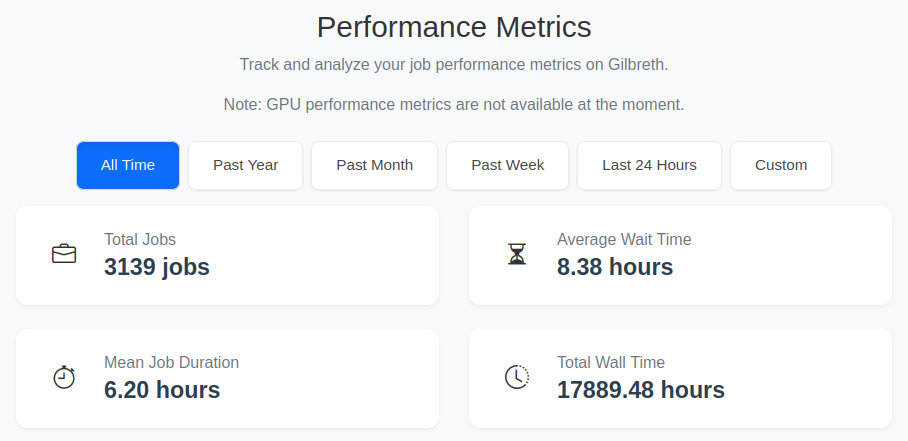
Job Performance Metrics
The job performance metrics dropdown provides an overview of your jobs within a specific time range. It reports the total jobs, wait time, average job duration, and total wall time of your jobs within the specified range. Memory, time, and CPU efficiency are also reported.
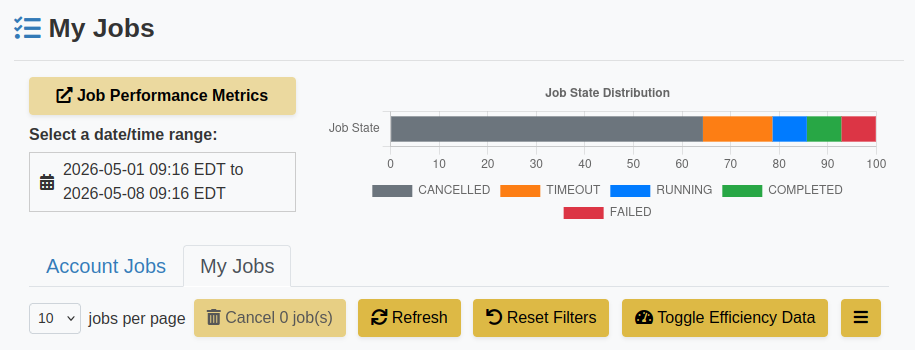
My Jobs
My Jobs provides you with an overview of the state of your jobs. You can filter, by date, account, partition, QoS, and state. For any job, you can click the expand button to see job details.